Pro Tools · Windows
Export and delivery for Pro Tools. You tell it what you want out — the mix, the instrumental, one acapella or both. It bounces them, trims the dead space off the ends, names them and files them under that artist. A session export is about a minute, and with Dropbox connected the artist has the files before you have packed up.
Out Friday, Oct 9 · Pro Tools · Windows 10 / 11

The part nobody books you for
Quick Stem does all seven while you pack up.
Running
It focuses Pro Tools, reads the track list off the screen, clicks the rows it needs and checks that each one actually took — re-clicking any that did not. If a track still will not select, it stops rather than bouncing the wrong thing.
A strip stays pinned above the DAW the whole time telling you where it is, and Esc kills it from anywhere.
Before it renders anything
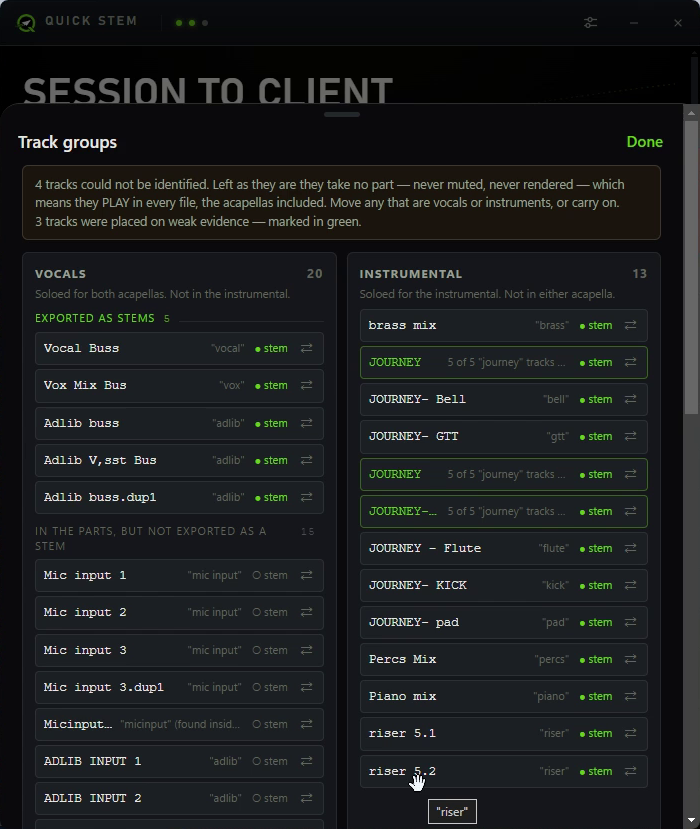
It reads every track and sorts them into vocals, instrumental and effects. What it is sure of, it states. What it is only fairly sure of, it marks. What it cannot place, it puts in front of you rather than guessing.
Drag anything that landed on the wrong side. Then it renders — and not one second earlier.
Quality control
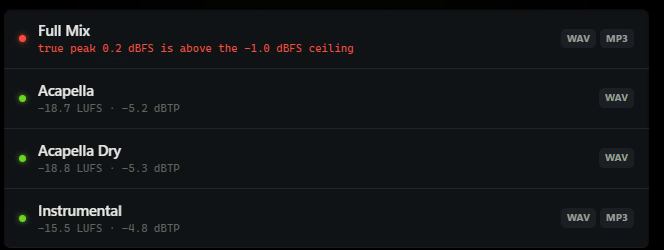
Every file is measured for loudness and true peak before it goes anywhere. Three passed here. The full mix did not — it true-peaks above the ceiling, and it says so in red rather than quietly shipping it.
A tool that never reports is a tool you cannot use.
Naming
Rendered
Song 1_Adlib buss.dup1-St_MASTER, Clean Version_12 Acapella Dry.wav
Delivered
Song 1 Zach Tory 6.13.2026 Acapella Dry.wav
You set the convention once. Every file for every client from then on arrives already named to it.
Four ways to leave a session
MP3
One file, 320 kbps. For when the session is over and the client is standing up.
WAV · MP3
Full-resolution master for the archive, 320 kbps for the phone.
Mix · Inst · Acapella ×2
Two acapellas — with the effects and without — so whoever gets it can put their own space on it.
Every stem
Named buses land in Stems/. Anything else is found and sorted automatically.
One full stem export — the heavy end
Times are your session’s, not the software’s. A two-track off a recording session is about a minute. A full stem export takes longer because there is more to bounce — the one measured above ran ten minutes for 41 tracks and six files. Nearly all of that is Pro Tools writing audio, at whatever offline speed you bounce at. What Quick Stem adds on top — trimming the dead space, naming, sorting, delivering — is seconds either way.
Launches Friday, October 9
Pro Tools export and delivery automation for Windows. Leave your email and you will hear the day it ships — and take $5 off with the code you get for signing up early.
Your discount code
EARLY5
Worth $5 off from Friday, October 9.
